
Friday Night Funkin'
All trademarks belong to their respective owners.
Description
Friday Night Funkin' & Newgrounds Overview
The Development History of FNF & Newgrounds
Friday Night Funkin' (FNF) was created by a passionate small team, led by developer ninjamuffin99, with art by PhantomArcade and evilsk8r and music composed by Kawai Sprite. The game originated on Newgrounds, embracing the platform’s open spirit while carrying on the legacy of classic Flash games and encouraging creative freedom across the community.
FNF’s Story Setting & The Boyfriend Character
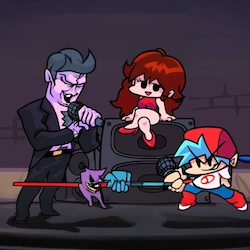
In Friday Night Funkin', you step into the shoes of Boyfriend a teenager constantly challenged by quirky opponents in tense rap battles. To win the affection of Girlfriend and earn her father's approval, Boyfriend must overcome every stage, proving his love through the power of music.
Flash Graphics & Kawai Sprite’s Music
FNF features a distinctly early-2000s Flash aesthetic, defined by simple, bold lines, bright colors, and expressive visual effects. Its electronic soundtrack, crafted by Kawai Sprite, blends electronic, lo-fi, and nu-jazz influences, giving Friday Night Funkin’ a unique musical identity.
Friday Night Funkin' Gameplay & Controls
Controls (PC / Laptop)
- Arrow Keys (↑ ↓ ← →): Press the matching direction to hit notes
- W A S D: Many versions/mods let you use this as an alternative to arrow keys
- Enter: Confirm / select / start songs in menus
- Esc: Pause / return to menu
Mobile
- Tap the on-screen arrows to hit notes (depends on the mobile/web port)
Tug-of-War Health Bar & Opponent System
Unlike classic point-based games, FNF uses a tug-of-war health bar. Hitting notes correctly shifts the bar toward your side; miss the beat and your opponent gains the edge. The action is non-stop, requiring you to maintain a steady rhythm if your health bar is depleted, it’s game over.
Custom Keybinds & Downscroll in FNF
FNF offers various control schemes: arrow keys, W-A-S-D, and many players prefer the DFJK layout for faster reaction times. You can customize audio-visual offset and enable downscroll to match your habits and device, creating a personalized gameplay experience.
Modes & Progression in Friday Night Funkin'
Weeks, Story Mode & Pico
Progress is divided into “weeks,” each introducing new rivals like Daddy Dearest, Skid and Pump, Pico, Senpai, and more. There are three difficulty settings Easy, Normal, and Hard with Hard Mode increasing the song speed and chart complexity, guaranteeing a consistently engaging challenge.
Freeplay Mode & Practicing FNF Songs
Players can jump into Story Mode to follow the narrative, or select Freeplay to practice any unlocked songs without limits a handy way to hone your skills before tackling tougher weeks.
Hard Mode Tips & FNF Mods
To conquer Hard Mode or tackle community-created mods, it's recommended to enable downscroll for easier navigation, adjust offset settings as needed for your device, and play with both hands splitting the keys is especially helpful for handling fast-paced songs.
Friday Night Funkin' Modding & Community
FNF’s Open-Source Code & Modding Community
One of FNF’s biggest draws is its open-source nature, welcoming anyone to create mods featuring new characters, tracks, and mechanics. This rich modding ecosystem keeps the game fresh with content updates every month.
Free Friday Night Funkin’ Experience
Friday Night Funkin’ is completely free to play in-browser. You can dive in and unlock all features with zero financial commitment welcoming both newcomers and veteran rhythm gamers alike.
Conclusion: Friday Night Funkin’ Rhythm Game
Friday Night Funkin’ blends classic rhythm game mechanics, a nostalgic Flash art style, and a dynamic community environmentmaking it a must-try for newcomers and rhythm game fans alike. It has become a staple of today’s Internet culture, where music, creativity, and challenge come together in powerful ways.
Information
Language
English
Category
H5 Games
Gender
Male
Female